
Calculators
A calculator asks visitors for a few inputs and shows them an instant, useful result — a monthly payment, a savings estimate, an ROI, a quote. It’s one of the most effective ways to turn a passive page visit into an engaged, qualified lead.
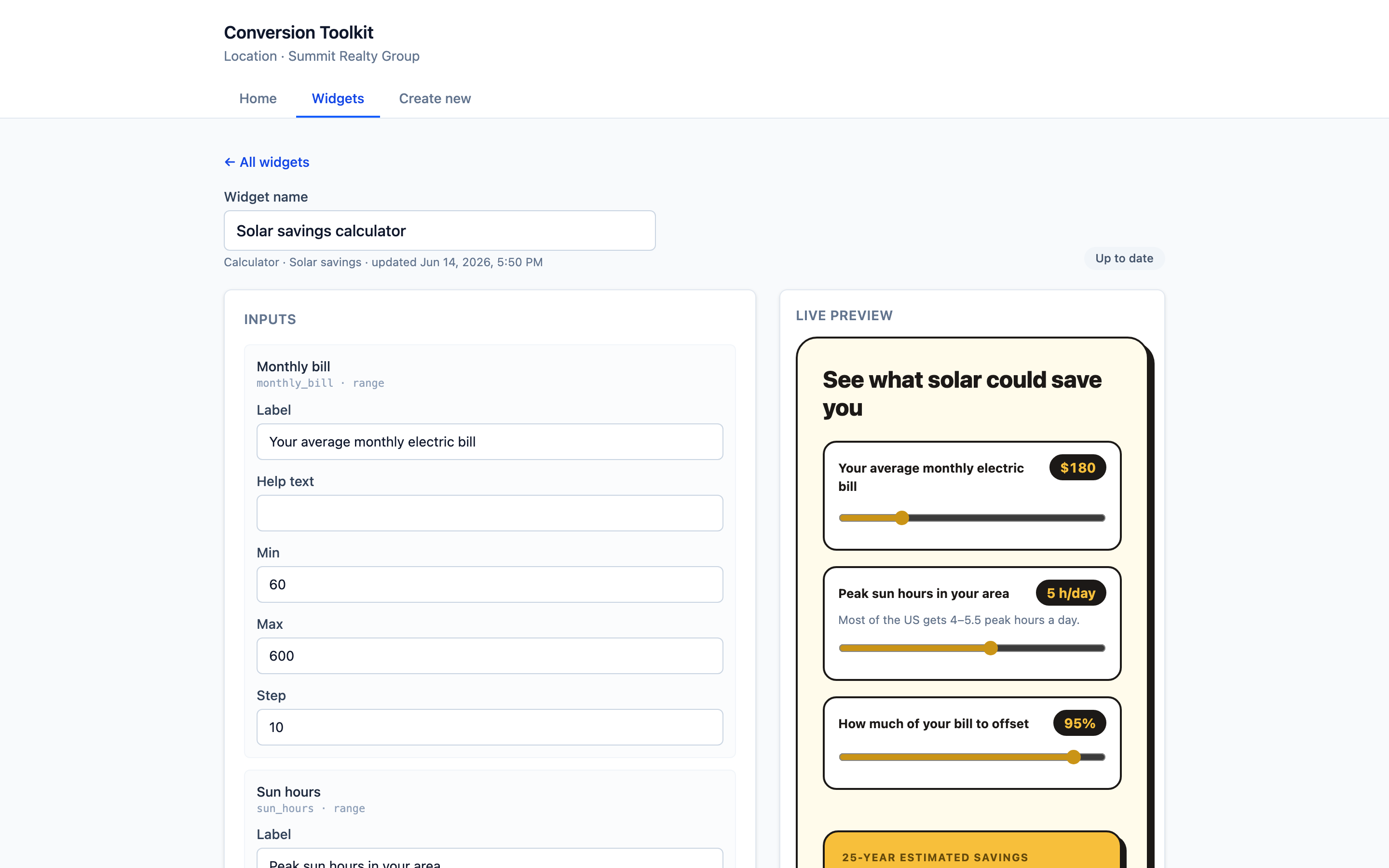
Settings
Inputs
The questions visitors answer. Each input is a slider/number with:
| Field | What it’s for |
|---|---|
| Label | What the visitor sees (e.g. “Your average monthly electric bill”) |
| Help text | A short hint under the label |
| Min / Max | The allowed range of the slider |
| Step | How much each nudge moves the value |
Inputs come from the template you chose (e.g. a mortgage calculator has loan amount, rate, term) — you adjust the labels and ranges to fit your audience.
Your pricing (instant-quote calculators)
A few calculators — HVAC, fencing, painting, concrete, and solar — turn a size into a price, so they need your rates. They ship with editable starter rates (e.g. Wood ($/ft), Installed cost ($/watt)) in a Your pricing section. The visitor’s choices (like “Wood”) just pick which rate to use — the dollar amounts are yours to set.
Content & call to action
- Headline — the title above the calculator, with an alignment control. Its colour, size, and font come from the theme, so the whole calculator stays consistent — see Themes & styling.
- Button label and Button URL — the call to action shown with the result.
- Reassurance line — optional fine print under the button, e.g. “Free — checking won’t affect your credit.” Great for finance and lending calculators, where a softer, lower-commitment ask converts better than a hard email wall.
- Disclaimer — the fine print under the results. Every template ships a sensible default; leave it blank to use that, or type your own to override it (for example, a law firm putting its own wording on the Injury settlement calculator). Always shown to visitors as small print.
Theme
Pick a named look as your base, then override any colour with a picker — accent, background, results panel, text, muted text, borders, and button text — plus corner radius and font. Blank colours inherit the look. See Themes & styling. The screenshots here use Bold pop.
Lead capture
Turn on lead capture and the button captures a contact in your CRM, tagged for your workflows. Then pick When they finish:
| Mode | What the visitor experiences |
|---|---|
| Show the result (default) | Results update live as they drag the sliders; clicking the button captures their email. |
| Require their email first | Results stay hidden until they submit the form, then appear. |
| Don’t show a price — collect & follow up | No figure is shown. Their inputs are captured as a quote request (tagged calculator-quote-request) so you can send a real quote. |
The last mode is built for jobs you can’t price sight-unseen: the visitor still does the interactive bit, but instead of a number they get a “we’ll be in touch” — pair it with a workflow that emails them or alerts your team. It’s the safe choice when you’d rather quote personally than show an estimate.
Calculators are also the one widget that can save the results to your CRM:
- Enable Save results to CRM custom fields and each result is written to its own contact field
(named
CT · …), created automatically on save. - Examples: a Mortgage payment calculator creates
CT · Total monthly (PITI),CT · Loan amount, and more; a Solar savings calculator createsCT · 25-year estimated savings,CT · Break-even point, etc.
See Tags & custom fields for the full list and the details.
Calculator catalog
Every calculator below is a ready-made template — pick one, adjust the labels and ranges, style it, and turn on lead capture. They’re grouped by the kind of business they fit. Each shows a live result as visitors move the sliders.
Mortgage & real estate
| Calculator | What it answers | Key inputs → results |
|---|---|---|
| Mortgage payment (PITI) | “What’s my monthly payment?“ | price, down, rate, term → monthly PITI, P&I, total interest |
| Home affordability | ”How much house can I afford?“ | income, debts, rate → max price, max loan, payment |
| Mortgage payoff | ”How fast could I be mortgage-free?“ | balance, rate, years, extra/mo → time & interest saved |
| Refinance break-even | ”Should I refinance?“ | balance, current payment, new rate/term, costs → monthly savings, break-even months |
| Seller net proceeds | ”What would I walk away with?“ | sale price, commission, payoff, costs → net proceeds |
Home services (instant quotes)
One engine, many trades — each shows a low / typical / high price range so you can promise a ballpark without over-committing. Rates are editable, so every shop can match its own market.
| Calculator | Key inputs → results |
|---|---|
| HVAC replacement quote | home size, system type, efficiency → installed price range + recommended tons |
| Fence installation quote | length, material, height, gates → price range |
| Painting quote | area, interior/exterior, stories, prep → price range |
| Concrete / driveway quote | area, finish → price range |
| Solar savings | bill, sun hours, offset → 25-yr savings, payback, system size, net cost |
Auto
| Calculator | Key inputs → results |
|---|---|
| Auto loan payment | price, down, trade-in, rate, term → payment, interest, total cost |
Money, savings & debt
| Calculator | Key inputs → results |
|---|---|
| Compound interest | start, monthly, return, years → final balance, contributions, interest |
| Retirement: on track? | age, savings, contribution, return, target income → projected nest egg vs. goal |
| Credit card payoff | balance, APR, monthly payment → time to pay off, total interest |
Insurance, health & fitness
| Calculator | Key inputs → results |
|---|---|
| Life insurance coverage (DIME) | income, debts, mortgage, education, existing → recommended coverage |
| Calorie needs (TDEE) | sex, age, height, weight, activity → maintenance, cut, bulk calories |
| Goal-weight timeline | current, goal, weekly loss → weeks to goal, daily deficit |
Legal
| Calculator | Key inputs → results |
|---|---|
| Injury settlement estimator | medical bills, lost wages, severity, fault → estimated settlement range |
Equipment & business lending
For equipment-finance, B2B and merchant-cash-advance brokers.
| Calculator | What it answers | Key inputs → results |
|---|---|---|
| Section 179 tax savings | ”What’s my write-off worth?“ | equipment cost, tax rate → first-year deduction, tax savings, net cost |
| Equipment finance payment | ”What’s the monthly?“ | cost, down, rate, term → payment, interest, total (also models a $1-buyout lease) |
| Equipment ROI & payback | ”Will it pay for itself?“ | cost, added revenue, operating cost → payback period, monthly cash flow, ROI |
| Merchant cash advance cost | ”What’s this advance really costing me?“ | advance, factor rate, term → total payback, cost, estimated APR, remittance |
| DSCR (loan eligibility) | “Will I qualify?“ | net operating income, existing debt, loan, rate, term → DSCR, debt service |
What visitors see
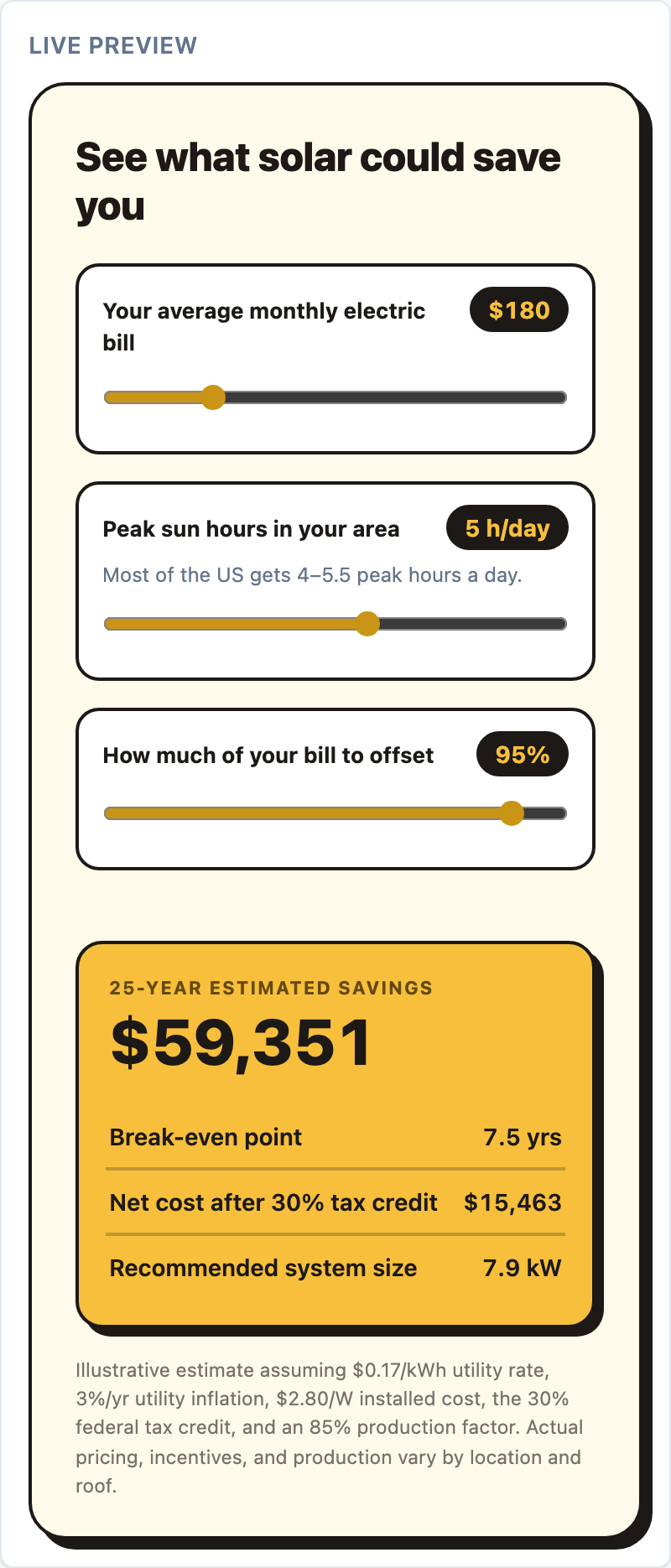
The result updates live as they move the sliders, then the lead gate captures the email before the full breakdown.
When to use a calculator
- Mortgage / loan / finance — “What’s my monthly payment?”
- Solar / home improvement — “What would I save?”
- Agencies / services — ROI or pricing estimators.
- Anywhere a visitor’s first question is “what will this cost / save me?”
Tips
- Keep inputs to the minimum for a believable result — fewer fields convert better.
- Lead with the outcome in your headline (“See your monthly payment”).
- Pair it with a workflow on the
calculator-leadtag to send the full breakdown by email — see Workflows & email campaigns.
[1] Demand Metric, Content Engagement research (via Upland Kapost), 2019.